| Kyberdigi Projects Network Traffic Analyzer | ||


|
||
| About Installation Download Demo Bugs Changelog Tips and tricks | ||
Software requirements (most of Linux distributions contain proper packages,
so probably you don't need to install everything manually):
Installation is simple, just unpack the downloaded file - one directory will be created. You can move this directory on your system whenever you want to (of course it may depend on your permissions). It is strongly recommended not to move any files from this directory away to another locations. In an example bellow the final destination directory is /usr/local/nta:
# tar xzf nta-x.y.tar.gz
# mv nta-x.y /usr/local/nta/ Before the program is being executed for the first time, you should edit the config.pl file - the only configuration file for this simple software. Use your favorite text editor for this. First of all you have to define network devices which should the software look at (you should be able to list all of available devices via the ifconfig command). You can assign names to any device:
%netdevices=(
'eth0' => 'Main Internet connection', 'eth1' => 'Local subnet', 'lo' => 'Loopback device' ); Usually your home computer has only one network device, so it is O.K. to have just one device configured. The rest of the config.pl file is a big %config variable. You don't need to see all of it right now, but please take a good care about line output_dir, where you must specify an existing directory with write permissions. You can edit the other lines too, they are well commented, so it should not be a problem for anybody to change configuration of whatever he wants. The main script nta.pl needs to be executed every 5 minutes to create correct stats. Use cron daemon to do it, for example via the crontab -e command. I strongly recommend you not to do it as root, use a non-privileged account for this action. Put this line to the crontab file:
*/5 * * * * (cd /full/path/to/nta/ && ./nta.pl)
Note:
On my very old computer (Pentium 166 MHz MMX, 192M RAM, with a really lot of processes running) I've tried to create full stats of last 24 hours, 7 days, 4 weeks and 6 months. The script was running for about 9 seconds. It is also recommended to check if everything works fine before crontab editing. Just step into the nta directory and run the nta script manually:
$ cd /full/path/to/nta/
$ ./nta.pl If you can't see any output, everything works fine. Otherways you should get an error message. Check the output in the output directory specified in config.pl file.
Note:
The software stores its data in a few files. You should have about 20kB free disk space per graph per network device.
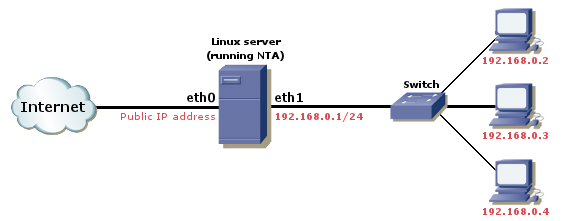
You can see a demo stats of a computer acting as a masquerading
firewall machine. The are two network devices in it - one being connected
to the internet (via an ISP) and second being connected to a switch
with other workstations connected to it.
Click this link to view full stats demo in a new browser window.
There are no known bugs at this moment. In case you find some, please let me know at
mccohy@kyberdigi.cz.
2006-05-10
Version 1.1
2003-05-30 Version 1.0
Antoine Megans reported that Linux kernel version 2.0 does not provide
special file /proc/net/dev, where NTA reads tha data about
transferred bytes. There is no known workaround, so please upgrade.
The program reads the /proc/net/dev file. If you want to check for another data, you can create your own file (you can let it be created periodically), but it has to have the same format as the original /proc/net/dev. The most important is device identificator (string before first colon) and then the first and ninth numerical value (bytes in and bytes out). Other numerical values are being ignored and can be set to zero. Edit the config.pl file, search for the proc_netdev keyword and point it to your own file.
|